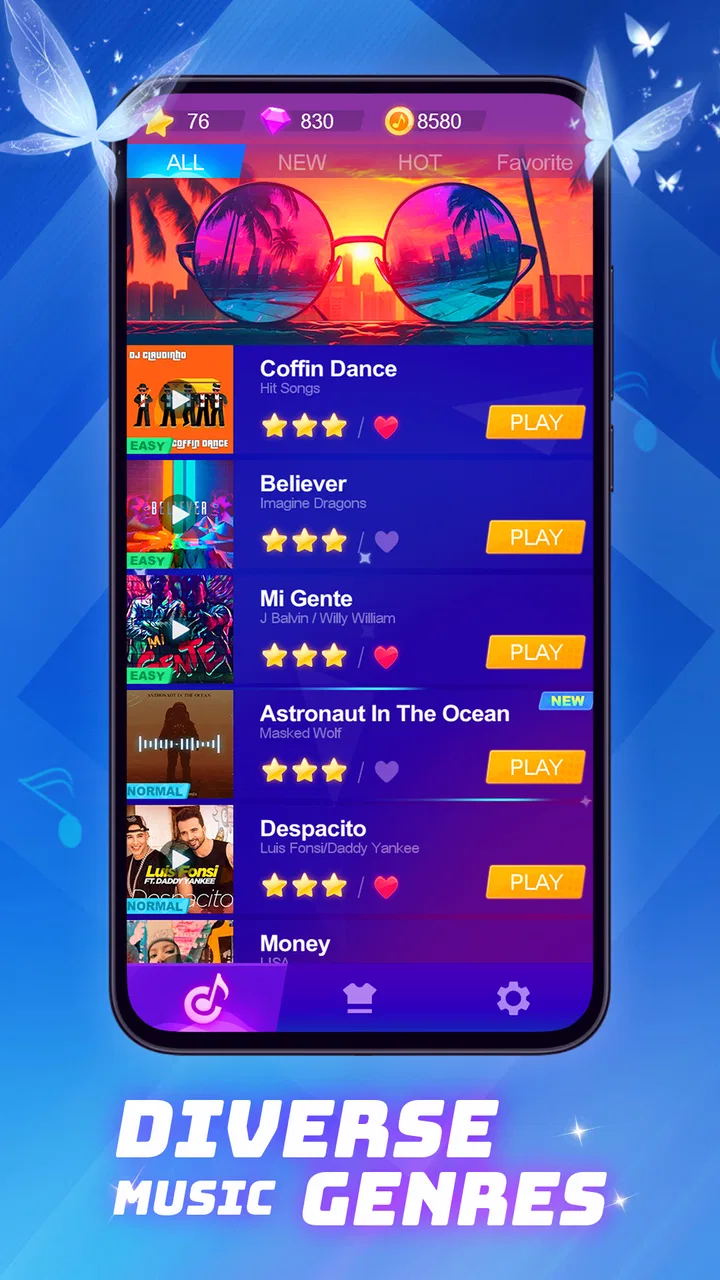
Piano Beat: Music Game
- 4.1
- Rating
- 50.00M
- Installs
- Free
- Price

 Analysis by App-foxy
I approached Piano Beat as a quick music game rather than a piano-learning tool, and that distinction matters from the first minute. It is built for tapping along with moving notes, chasing a cleaner run, and enjoying a short burst of rhythm-focused play. The basic appeal is easy to understand: open it when you have a few spare minutes, choose a track or mode that suits your mood, and try to stay with the beat.
That simplicity is also where some players may get stuck. A rhythm game can feel unfair when the screen is busy, the timing seems late, or a song becomes difficult before your hands have settled into its pace. In my experience, the best way to judge this game is not by asking whether it replaces a real keyboard. It does not. The better question is whether it gives you an enjoyable, repeatable music challenge without demanding a long session.
What to expect before your first session
This is a free music game from Dream Tiles Piano Game Studio, aimed at players who enjoy beat-matching more than formal practice. It is available for devices running Android 6.0 or later, carries a Teen content rating, and has reached over 10 million installs. Those figures suggest that the format is familiar and accessible, but popularity alone does not make every session comfortable. Your experience will depend heavily on the phone or tablet, touch response, sound settings, and how much patience you have for repeating a difficult passage.
You May Also Like

 AccuWeather: Weather Radar
AccuWeather Review: A Quick, Clear Forecast for Everyday Decisions
For everyday plans, the best forecast is the one you can understand quickly. AccuWeather makes rain timing, radar, and local conditions easy to act on, with a few trade-offs.

 Hill Climb Racing
Why Hill Climb Racing Still Turns Crashes Into One More Run
A tiny car, a bumpy hill and one more upgrade: Hill Climb Racing keeps resurfacing because its simple chaos makes every near-miss feel personal.

 AliExpress - Shopping App
AliExpress Makes Global Shopping Feel Personal, but Shoppers Bear the Risk
AliExpress turns a global marketplace into a pocket-sized discovery engine. Its reach is useful, its shopping loop compelling, and its trade-offs easy to miss.

 Lords Mobile: Kingdom Wars
Lords Mobile Is a Kingdom-Building Routine, Not a Quick Match
A case-by-case verdict on the building, battles, device demands, and social commitments that make Lords Mobile rewarding for some players and exhausting for others.

 PDF Scanner app - TapScanner
TapScanner Makes Paperwork Easier to Capture, Check, and Share
TapScanner makes scanning with a phone feel less like a rescue operation and more like a dependable step in getting work done. Its capture tools are useful, though not flawless.

 Block Blast!
 Shows How Much a Puzzle Game Can Leave Out
A quiet grid game shows why puzzle players increasingly value instant clarity, repeatable skill and low-pressure play—and where the genre still needs to catch up.
More From Our News Desk
View All News


The game has an average rating of 4.4 from around 20 thousand ratings, with 81 written reviews shown alongside it. I would read that as a positive sign for the core idea, not as a promise that every device will behave identically. Rhythm games are unusually sensitive to small delays. A title can feel excellent on one phone and awkward on another simply because the screen, audio output, or background activity changes the timing.
The current version is 1.6.9, and the game is free to start. Optional in-app purchases range from $0.99 to $39.99 per item. That price range is worth keeping in mind before you become invested in progress or extra content. I recommend treating the free experience as a test: play long enough to decide whether the tapping feels natural on your device, then consider spending only if the game has earned a regular place in your routine.
Where players commonly get stuck
The first trouble spot is usually not understanding the objective. It is adjusting to the timing. New players often watch the note itself instead of the point where it must be tapped, then react a fraction too late. I found it more useful to focus on the lower part of the play area and use the music as a second guide. Once the pattern becomes familiar, the game feels less like reading individual tiles and more like following a repeating phrase.
Another common obstacle is starting with a song or challenge that is simply too demanding. A failed run can tempt you to tap faster, but speed is rarely the complete answer. When a section goes wrong, I pay attention to whether the mistake comes from rushing, hesitating, or losing track of the next note after a successful tap. Those are different problems and need different corrections. Rushing calls for listening more closely; hesitation calls for watching the approach path; losing the next note calls for reducing visual distractions around the screen.
Small screens can add their own friction. If your fingers cover the lower portion of the display, you may miss the next cue even when your timing is reasonable. Holding the device steadily, rather than changing grip during a run, makes a surprising difference. I also avoid playing with one hand when a pattern moves quickly across the available area. Two-handed play gives me a more stable view and reduces the chance that a finger blocks the next target.
Sound is another important part of the experience. Playing silently can be convenient in public, but it removes one of the most useful timing references. If headphones make the beat clearer, use them in a quiet setting. If the audio feels delayed or uncomfortable, do not immediately assume your tapping is wrong. Test the same section through the device speaker, because the output method can change how easy it is to anticipate the beat.
Setup checks that prevent avoidable frustration
Before judging the game, I would close demanding apps running in the background and make sure the phone has enough free space for normal operation. This is not a special Piano Beat requirement; it is a sensible first check for any touch-based game where interruptions or sluggishness can affect a run. A crowded device may respond less consistently, especially when notifications, updates, or other active processes compete for attention.
Keep the device in the orientation that feels most stable and avoid starting a serious attempt while the phone is switching between networks or handling a large download. A brief practice session is a better test than a single failed round. Play several attempts at the same difficulty and look for a pattern. If every miss happens at the same visual moment, your technique may need work. If the whole screen feels delayed or uneven, the device environment deserves attention first.
Touch the screen with a light, deliberate motion rather than pressing hard. Heavy taps can make your hand tense and may slow the transition to the next note. I find that relaxed wrists and slightly bent fingers are more useful than trying to force accuracy. This is one of the less obvious adjustments for beginners: the goal is not to hit the display with maximum certainty, but to make small movements that can be repeated without fatigue.
Notifications deserve a practical mention. A banner or incoming call appearing during a run can break concentration and make the following notes seem mistimed. When I want a clean attempt, I use the phone's normal interruption controls and play somewhere I will not be repeatedly distracted. That does not change the game itself, but it changes the quality of the test. A rhythm challenge is difficult to evaluate when the player is constantly pulled away from it.
If the game opens but the session does not feel responsive, I would first restart the app, then restart the device if the issue continues. I would also check that the operating system meets the stated minimum of Android 6.0 or later. These are basic steps, but they are more useful than immediately reinstalling or assuming that a purchase is required. Reinstalling can also be inconvenient if you are unsure how progress is handled, so I would reserve it for persistent problems after simpler checks have failed.
Recovering a run after a mistake
One of my most useful habits with this type of game is separating recovery practice from score chasing. When I miss a note, I do not instantly restart every time. I watch what happens next and try to rejoin the pattern. That teaches a skill that a perfect opening does not: staying calm after an error. A player who can recover from one missed tap will often make more progress than someone who restarts whenever the first section is imperfect.
For difficult passages, I use a three-step loop. First, I play normally to identify the exact point where control breaks down. Second, I replay while concentrating only on the rhythm immediately before that point. Third, I attempt a full run without changing anything else. This keeps the problem specific. Repeating the entire track without knowing what went wrong can create frustration without improving the troublesome movement.
It also helps to change one variable at a time. If you switch from headphones to speakers, change grip, raise the difficulty, and play while walking, you will not know which change affected the result. I prefer to keep the same device position and audio setup for several attempts. Then I make one adjustment and compare how the next run feels. This is a simple way to distinguish a timing issue from a comfort issue.
When a session becomes tense, take a short break instead of forcing another attempt. Fatigue affects rhythm games quietly: the first few taps may remain accurate while later movements become rushed. A short pause can restore attention better than lowering your expectations and continuing through increasingly messy runs. The game works best for me in compact sessions, where I stop while the challenge still feels engaging rather than exhausting.
Purchases should be approached with the same patience. Since the game is free but includes optional items priced from $0.99 to $39.99, I would not buy something simply because a difficult section is irritating. First decide whether the purchase changes the kind of experience you want, or merely removes a momentary obstacle. If the free version already gives you satisfying short sessions, spending may be unnecessary. If you dislike repeating tracks, paying will not automatically solve the underlying timing challenge.
When the app may not be the cause
It is easy to blame the game when a run feels late, but several outside factors can create that impression. Bluetooth audio can introduce a delay, and even a small delay matters when taps must line up with music. A wired output or the built-in speaker may provide a more direct reference on some devices. I would compare them before deciding that the timing is broken.
Screen protectors, damp fingers, cold hands, and an unstable grip can also affect touch confidence. None of these means the game is defective, but they can make a precise tapping task feel inconsistent. Clean and dry the screen, place the phone on a stable surface, and try again with a relaxed hand. If the result changes noticeably, the environment was part of the problem.
Performance can suffer when the device is hot, nearly out of storage, or busy with other work. A game that feels smooth at the beginning of a session may become less comfortable after prolonged use if the phone is under strain. I would test it after closing other apps and allowing the device to cool. This kind of check is especially important before writing off the game or spending money inside it.
There is also a difference between a technical fault and a design preference. Some players want a piano game that teaches notes, scales, hand positions, or sight-reading. Piano Beat is not the right choice for that goal. Its appeal is immediate musical interaction and reflex-based play, not a structured lesson plan. For learning real keyboard skills, a dedicated educational app or an actual instrument would be a better match.
Likewise, players who want deep composition tools, recording, or a full library-management workflow should look elsewhere. A rhythm game is more convenient for a quick challenge than a conventional piano simulator, but that convenience comes with less control. I would choose this title for casual play during a break, while choosing a simulator or lesson app when the purpose is deliberate study.
How it fits into everyday use
A realistic use case is a short commute or a quiet break between tasks. I can imagine opening the game for a few attempts, using headphones if the surroundings allow it, and stopping after a satisfying run rather than committing to a long campaign. The format suits people who like measurable improvement but do not want to arrange a full gaming session. It is also a reasonable choice for someone who enjoys music-themed games and wants something more active than simply listening.
Families should pay attention to the Teen content rating and to the purchase range. The game may be easy to start, but that does not make it automatically suitable for every child or every shared device. If someone else uses your phone, review the normal purchase protections on the device before handing it over. That is a sensible precaution whenever a free game offers optional items, particularly when the highest listed price is much larger than the smallest one.
The game is strongest when you enjoy repetition. Improvement comes from recognizing patterns, refining timing, and trying again after a near miss. If you need constant novelty or dislike replaying a section, the central loop may feel narrow. On the other hand, if you like the small satisfaction of turning a messy run into a clean one, the design has a clear reason to return.
Compared with a standard piano-learning app, this is faster to pick up and less intimidating, but it offers less educational structure. Compared with a traditional piano simulator, it is more focused on reaction and rhythm than on realistic playing. Compared with other casual music games, its main advantage is the directness of the tapping loop: you can understand the basic interaction quickly without first learning a complicated interface. The trade-off is that players seeking detailed control or serious practice will outgrow it.
My practical verdict
I recommend Piano Beat to people who want a free, music-centered game for short sessions and who are willing to improve through repetition. The large install base and 4.4 average suggest that the basic concept connects with many players, and I can see why: the game turns a familiar piano-tile idea into an immediately readable challenge. It is easy to imagine playing one round casually and then trying again because the last attempt was almost clean.
I would begin with a device check rather than a purchase. Confirm that your phone runs Android 6.0 or later, close background apps, choose the clearest audio setup, and play several attempts before deciding how well the timing suits you. If the game feels delayed, test the speaker and headphones separately. If misses happen only in one pattern, work on that pattern instead of treating the whole experience as unreliable.
The best reason to keep it installed is the quick feedback loop: listen, tap, notice the mistake, and try again. That loop is satisfying when you like rhythm challenges, but it is not a substitute for piano instruction. Players who want lessons, composition, or realistic keyboard practice should choose a more specialized alternative. Players who want an accessible music game for spare moments will find a better fit here.
My final view is positive but measured. The free entry point makes it easy to test, the current version is 1.6.9, and the game has enough appeal to support repeated short sessions. Still, your enjoyment will depend on timing comfort, screen responsiveness, and tolerance for retries. I would recommend giving it a fair trial in a quiet setup, keeping purchases optional, and judging it by the pleasure of improving a run rather than by expectations it was never designed to meet.
FAQs for Piano Beat: Music Game
01What is Piano Beat: Music Game and how does it work?
Piano Beat: Music Game is an engaging rhythm-based game where players tap on tiles in sync with popular music tracks to score points. The gameplay involves following the beat and rhythm of each song, challenging your reflexes and timing skills. The app offers a variety of songs across different genres to keep the experience fresh and exciting.
02Is Piano Beat: Music Game free to download and play?
Piano Beat: Music Game is free to download and play, but it includes in-app purchases. These purchases can enhance the gaming experience by unlocking additional songs or features. While the core gameplay is accessible for free, certain premium content may require payment. Users can enjoy a substantial amount of content without spending any money.
03What are the minimum device requirements for Piano Beat: Music Game?
To enjoy Piano Beat: Music Game smoothly, you need a device running at least Android 5.0 or iOS 10.0. Ensure your device has adequate storage space and RAM to handle the graphics and smooth gameplay. Keeping your device updated will also help in running the game efficiently without any hitches.
04Does Piano Beat: Music Game offer a multiplayer mode?
Currently, Piano Beat: Music Game focuses on single-player gameplay, allowing users to compete against their own high scores and improve their skills. While it does not have a direct multiplayer mode, players can share their scores on social media and challenge friends to beat them, adding a competitive edge indirectly.
05How often does Piano Beat: Music Game update its song library?
Piano Beat: Music Game regularly updates its song library, introducing new tracks to keep the gameplay fresh and exciting. Updates may occur monthly or alongside major app updates. Users are encouraged to check the app frequently for new song additions and improvements, ensuring a dynamic gaming experience.
Pros
- Engaging rhythm gameplay.
- Wide selection of songs.
- User-friendly interface.
- Offline play available.
- Regular updates with new tracks.
Cons
- In-app purchases can be pricey.
- Ads can be intrusive.
- Limited free song options.
- Occasional lag on older devices.
- Requires significant storage space.

Piano Beat: Music Game
Gallery